Example subagents from the docs
The 4 files in Example subagents, copied as written. Load one into the builder to change it, or into the checker to see every rule pass.
code-reviewer
A read-only subagent that reviews code without modifying it.
---
name: code-reviewer
description: Expert code review specialist. Proactively reviews code for quality, security, and maintainability. Use immediately after writing or modifying code.
tools: Read, Grep, Glob, Bash
model: inherit
---debugger
A subagent that can both analyze and fix issues.
---
name: debugger
description: Debugging specialist for errors, test failures, and unexpected behavior. Use proactively when encountering any issues.
tools: Read, Edit, Bash, Grep, Glob
---data-scientist
A domain-specific subagent for data analysis work.
---
name: data-scientist
description: Data analysis expert for SQL queries, BigQuery operations, and data insights. Use proactively for data analysis tasks and queries.
tools: Bash, Read, Write
model: sonnet
---db-reader
A subagent that allows Bash access but validates commands to permit only read-only SQL queries.
---
name: db-reader
description: Execute read-only database queries. Use when analyzing data or generating reports.
tools: Bash
hooks:
  PreToolUse:
    - matcher: "Bash"
      hooks:
        - type: command
          command: "./scripts/validate-readonly-query.sh"
---The db-reader example calls ./scripts/validate-readonly-query.sh, a script the same docs section gives you to save first. Without it the hook fails instead of blocking writes.
Where subagent files live
You write files to two places: .claude/agents/ for the current project and ~/.claude/agents/ for all your projects. Claude Code also loads subagents from managed settings, the --agents flag and plugins, in this order:
Project subagents are found by walking up from the working directory, and the closest .claude/agents/ wins on a name clash. Two files with the same name in one folder load only one of them, "chosen by filesystem read order rather than a documented precedence" (Choose the subagent scope). Keep names unique.
| memory | Folder it writes to | Use when |
|---|---|---|
| user | ~/.claude/agent-memory/<name-of-agent>/ | the subagent should remember learnings across all projects |
| project | .claude/agent-memory/<name-of-agent>/ | the subagent's knowledge is project-specific and shareable via version control |
| local | .claude/agent-memory-local/<name-of-agent>/ | the subagent's knowledge is project-specific but shouldn't be checked into version control |
The memory field adds a second folder the subagent keeps notes in (Enable persistent memory).
How Claude picks a subagent
Claude "automatically delegates tasks based on the task description in your request, the description field in subagent configurations, and current context". So the description does the routing. Write it so it fits one subagent only, and add "use proactively" if you want Claude to reach for it without being asked.
Keep descriptions short. Claude Code warns at startup when your subagents' descriptions add up to more than 15,000 tokens, and still loads every subagent. Put detail in the system prompt instead, which only loads when that subagent runs. To call one by hand, name it ("Use the code-reviewer subagent to...") or @-mention it.
Every frontmatter field
All 19 fields in the frontmatter table as of 2026-11-14. Names are case-sensitive camelCase, and Claude Code ignores a field it does not recognize without an error.
| Field | Required | What it does (first line of the docs) | Values |
|---|---|---|---|
| name | Yes | Unique identifier of at most 256 characters, such as code-reviewer or reviewer-v2. | |
| description | Yes | When Claude should delegate to this subagent | |
| tools | No | Tools the subagent can use, as a comma-separated string such as Read, Grep, Bash or a YAML list. | |
| disallowedTools | No | Tools to deny, removed from inherited or specified list. | |
| model | No | Model to use: sonnet, opus, haiku, fable, a full model ID such as claude-opus-5-5, or inherit. | sonnet, opus, haiku, fable, a full model ID, inherit |
| permissionMode | No | Permission mode: default, acceptEdits, auto, dontAsk, bypassPermissions, plan, or manual as an alias for default. | default, acceptEdits, auto, dontAsk, bypassPermissions, plan, manual |
| maxTurns | No | Maximum number of agentic turns before the subagent stops. | |
| autoCompactWindow | No | Lower the auto-compact window for this subagent to a token count from 100000 to 1000000. | 100000 to 1000000 |
| skills | No | Skills to preload into the subagent's context at startup. | |
| mcpServers | No | MCP servers available to this subagent. | |
| hooks | No | Lifecycle hooks scoped to this subagent. | |
| memory | No | Persistent memory scope: user, project, or local. | user, project, local |
| background | No | Set to true to keep this subagent in the background even when Claude asks to wait for it. | true |
| omitClaudeMd | No | Set to true to start this subagent without the user, project, and local CLAUDE.md files in its initial context; managed policy files still load, except for managed subagents. | true |
| effort | No | Effort level when this subagent is active. | low, medium, high, xhigh, max |
| isolation | No | Set to worktree to run the subagent in a temporary git worktree, giving it an isolated copy of the repository branched by default from your default branch rather than the parent session's HEAD. | worktree |
| color | No | Display color for the subagent in the task list and transcript. | red, blue, green, yellow, purple, orange, pink, cyan |
| initialPrompt | No | Auto-submitted as the first user turn when this agent runs as the main session agent (via --agent or the agent setting). | |
| experimental | No | Map of experimental options. | cacheTtl: 5m or 1h |
Tool names for the tools field
The 45 built-in names in the tools reference, the exact strings tools and disallowedTools take. Struck-through names are removed from every subagent "even when listed in the tools field" (Available tools).
- Agent
- Artifact
- AskUserQuestion
- Bash
- CronCreate
- CronDelete
- CronList
- Edit
- EndConversation
- EnterPlanMode
- EnterWorktree
- ExitPlanMode
- ExitWorktree
- Glob
- Grep
- ListAgents
- ListMcpResourcesTool
- LSP
- Monitor
- NotebookEdit
- PowerShell
- PushNotification
- Read
- ReadMcpResourceTool
- RemoteTrigger
- ReportFindings
- ScheduleWakeup
- SendFeedback
- SendMessage
- SendUserFile
- ShareOnboardingGuide
- Skill
- SubagentHandback
- TaskCreate
- TaskGet
- TaskList
- TaskStop
- TaskUpdate
- TodoWrite
- ToolSearch
- WaitForMcpServers
- WebFetch
- WebSearch
- Workflow
- Write
Agent is removed only at the nesting depth limit, and ExitPlanMode stays when permissionMode is plan. MCP tools use mcp__server__tool names, and mcp__github__* gives a subagent every tool from one server.
What the checker flags
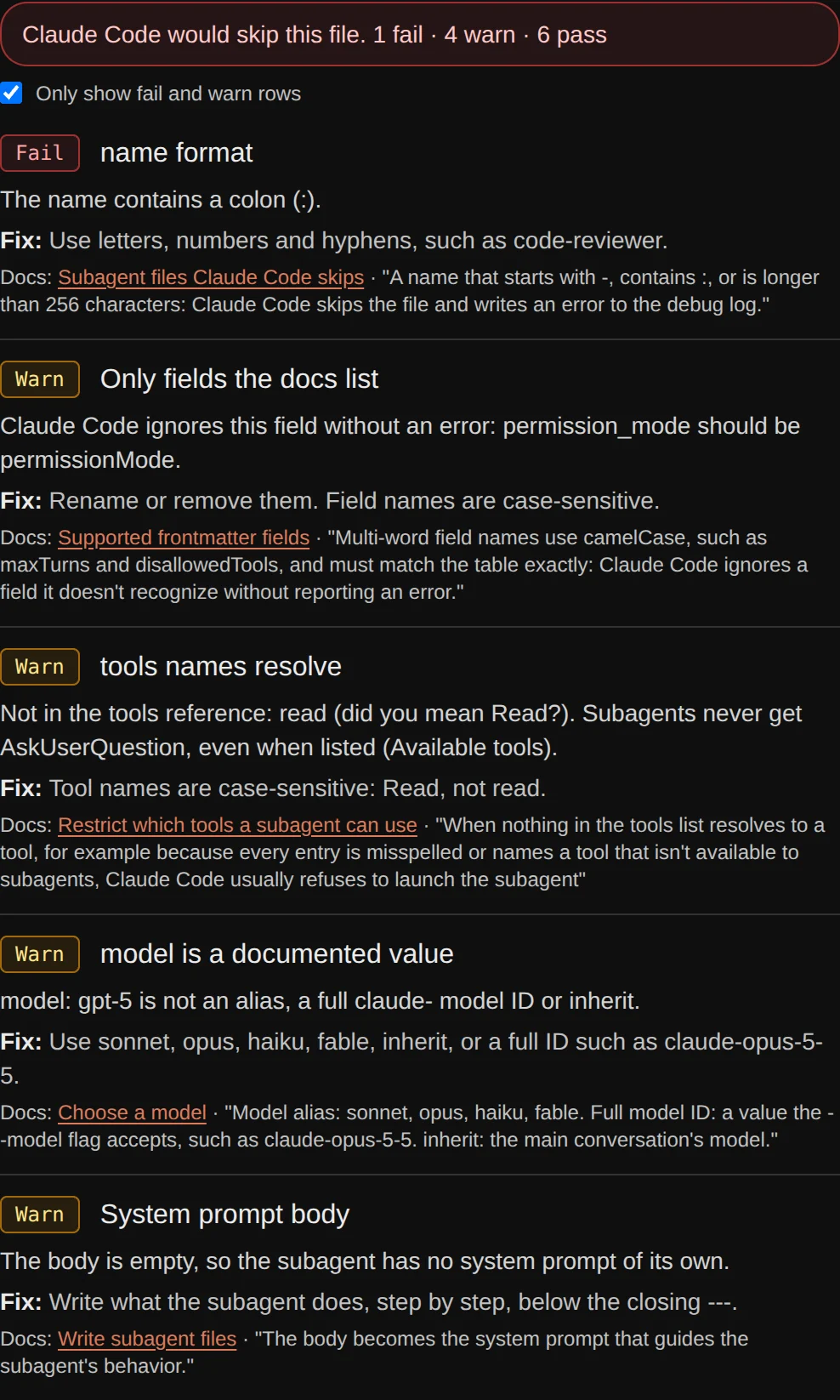
One row per rule. Fail means Claude Code skips the file or the subagent fails to launch. Warn means it loads, but a field will not do what you meant.
| Rule | Docs section |
|---|---|
| Frontmatter starts on line 1 | Subagent files Claude Code skips |
| Frontmatter YAML parses | Subagent files Claude Code skips |
| name is present | Subagent files Claude Code skips |
| description is present | Subagent files Claude Code skips |
| name format | Subagent files Claude Code skips |
| Only fields the docs list | Supported frontmatter fields |
| tools names resolve | Restrict which tools a subagent can use |
| disallowedTools names resolve | Restrict which tools a subagent can use |
| model is a documented value | Choose a model |
| Other field values match the docs | Supported frontmatter fields |
| System prompt body | Write subagent files |
How it works
- A script in this site's repo reads the Markdown of the subagents page and the tools reference and writes a data file: the fields table, each field's allowed values, the scope and memory tables, the tool names and the example files. Nothing here is typed from memory.
- The builder prints fields in the docs' table order, quotes a value only when YAML needs it, and writes
toolsas a comma-separated string like the docs' examples. Load an example and the output matches the docs file. - The checker parses the frontmatter with the open-source yaml library, then runs the 11 rules in the table above.
It does not check inline MCP server definitions, the hook commands inside hooks, or whether a model ID exists on your account. Check hooks in your settings with the settings.json validator.
FAQ
What are Claude Code subagents?
The docs call them "specialized AI assistants that handle specific types of tasks". Each one runs in its own context window with its own system prompt, tool access and permissions, and returns a summary to your main conversation (Create custom subagents). A custom subagent is one Markdown file with YAML frontmatter.
Where do I save a subagent file?
In .claude/agents/ for one project, or ~/.claude/agents/ for all your projects. Both folders are scanned recursively, so subfolders such as agents/review/ work. The subfolder does not change how the subagent is named or called (Choose the subagent scope).
Which frontmatter fields are required?
Only name and description. The other 17 are optional (Supported frontmatter fields). The file name does not have to match name.
Why does Claude Code ignore my subagent?
Check the file with the checker above. Claude Code skips a file without telling you when it has no name, no description, a --- that is not on line 1, a name with a colon, or YAML that does not parse (Subagent files Claude Code skips). If the agents folder did not exist when the session started, restart Claude Code.
How do I make a read-only subagent?
List only read tools, such as tools: Read, Grep, Glob, or keep everything else and add disallowedTools: Write, Edit. If you set both, disallowedTools is applied first (Restrict which tools a subagent can use). The docs' code-reviewer example works this way.
Is what I type uploaded anywhere?
No. The builder and the checker are JavaScript in your browser. There is no backend, no account and no model call. A file you choose is read with the browser's File API.
Related
Sources
Both read on 2026-11-14. The hash is the sha256 of the page's Markdown export (the page URL with .md added).
| Page | sha256 |
|---|---|
| Create custom subagents | 00bda45456b22baae5d1a3f953f1d84b2fb8c191871d7e8753d13a24d9b74cf5 |
| Tools reference | fe2d97e824c95da2dda7f2c47c3ebe35c063d952addacdb6cdc560ff30be9817 |